
Security and deployment
Your data, your deployment choice.
Run Fritech ERP in the Fritech cloud or on your own infrastructure. Either way, access is controlled by roles and permissions, every change is audited, and the most sensitive personal data is encrypted and masked inside the product.
Deployment options
Cloud or on-premises. The choice is yours.
Fritech cloud
Hosted in secure, US-based data centres, following industry-standard security practices. Sign in from any browser at app.fri-tech.com.
On-premises
Prefer the control of your own infrastructure? Fritech ERP deploys on your servers. Requirements, operations and backup responsibilities are agreed with your IT team during implementation, and our specialists help you choose and set up the model that fits your security policies.
Backups
Nightly backups, kept off-site.
The backup policy of the Fritech cloud. On-premises deployments follow the backup arrangements agreed with your IT team.
Frequency
- The database and uploaded files are backed up every night
- An additional backup is taken before every software deployment
Retention
- Off-site copies are kept for 30 days; recent copies are also kept on the server
Independence
- Backup copies are stored with a provider independent of the hosting provider, so recovery does not depend on one system
Access control
Who can see and do what, decided per role.
Sign-in
- E-mail and password with an authenticator-app second factor and single-use recovery codes
- Optional Remember this device: after a real authenticator code, a person may skip the code on that browser for 30 days (an administrator can shorten it or switch it off); the password is still asked at every sign-in
- Password policy of 12 to 128 characters, strength-checked; single-use reset links; rate-limited attempts
- Sessions end after 30 minutes idle or 12 hours; the mobile apps use revocable device tokens
Permissions
- Roles built from fine-grained permissions, with action grants, branch data scopes and hidden sensitive fields
- Role templates from accountant to warehouse keeper to start from
- Home figures, reports and the AI Companion show only what the role may read
- Branch scopes are enforced; a warehouse scope can be saved on a role but is not yet enforced
Audit and personal data
- Every create, update and delete recorded with before-and-after values, together with sign-ins and AI tool calls, in the same transaction as the change
- Government ID numbers and birth dates held on people records are encrypted at rest (AES-256-GCM) and always masked; revealing them needs a dedicated permission and is audited
- Vendor bank account numbers and mail-server passwords stored encrypted (AES-256-GCM); the application never shows a full account number
Sign-in
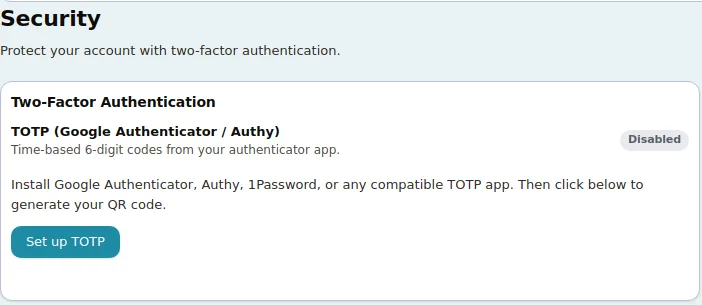
A second factor each user sets up in a minute.
From their own Security page, users add an authenticator-app second factor: time-based six-digit codes from Google Authenticator, Authy, 1Password or any compatible app, with single-use recovery codes for a lost phone. Passwords are strength-checked, reset links work once, and sign-in attempts are rate limited. On a trusted browser a person may tick Remember this device after entering a real code and skip the code there for 30 days; the password is still required, the period never extends on use, and an administrator can shorten it or switch it off for the company.
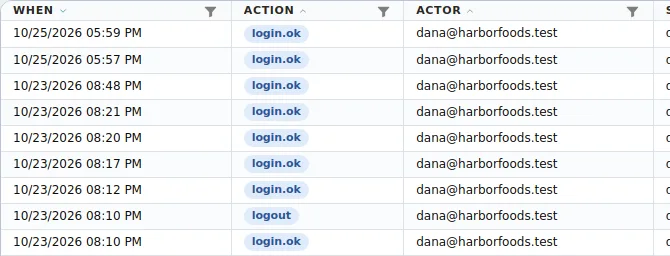
Audit log
Every sign-in and every change, on the record.
The security audit log lists identity and sign-in events per user and device. On every record, the change-history panel shows who changed what and when, with the values before and after, filtered and downloaded as CSV.
Good to know
What the product does, and what it does not claim.
Companies in one Fritech ERP installation are separated by company scope on every table: users see only their company's records, and a superadmin manages companies. Single sign-on through SAML, Google or Microsoft, passkeys and IP allow-lists are not offered today; sign-in is e-mail and password with an authenticator second factor, which a person may choose to skip on a remembered browser for a limited period.
The AI Companion, the scan inbox and AI Insights use an AI service configured on the server by Fritech; the Companion reads only what the user's role allows and never changes a record on its own. Ask in the demo how the AI service is set up for your deployment, including on-premises installations.
The audit log is kept with your company's data for as long as the company exists; there are no separate retention settings or exports yet, and change history is read on each record or downloaded as CSV.
Fritech does not claim third-party security certifications. For a security questionnaire or a detailed review with your IT team, request a demo and we will arrange it.
FAQ
Hosting and security questions.
Is Fritech ERP cloud-based, or can it be hosted on our own servers?
Fritech ERP supports both cloud and on-premises deployment. The choice is yours.
Whether you prefer the flexibility of a cloud-hosted solution or the control of running Fritech ERP on your own infrastructure, we support both, and our team helps you choose and implement the model that fits your requirements, IT infrastructure and security policies. See Security and deployment.
How is our business data secured and backed up?
The Fritech ERP cloud is hosted in secure, US-based data centres, following industry-standard security practices. Access is controlled by roles and permissions, sign-in has a second factor, and every change is audited.
The database and your files are backed up every night and copied to independent off-site storage, where they are kept for 30 days.
Backup arrangements for on-premises deployments are agreed with your IT team as part of the implementation.
Can you migrate data from our existing ERP system?
Yes. You decide what data you want to migrate and provide us with the files from your existing system.
Our team takes care of the rest: analysing your data, mapping it to Fritech ERP and handling the necessary conversions and transformations. Once you review and approve the mapping, we import your data.
There are no templates to fill in and no data conversion on your side: your part is choosing what to migrate, providing the files and approving the mapping.
See Fritech ERP on your own order, receipt and month-end.
Tell us how your business works. We come back with a few times to choose from, and the demo runs in the product on your scenarios, not a slide deck.