
Purchasing and payables
From requisition to paid bill, matched line by line.
Buy against vendor price lists, receive against the purchase order, match the bill to what was ordered and received, and pay through a bank file. Supplier invoices arrive as PDFs or photos and are read into draft bills for review.
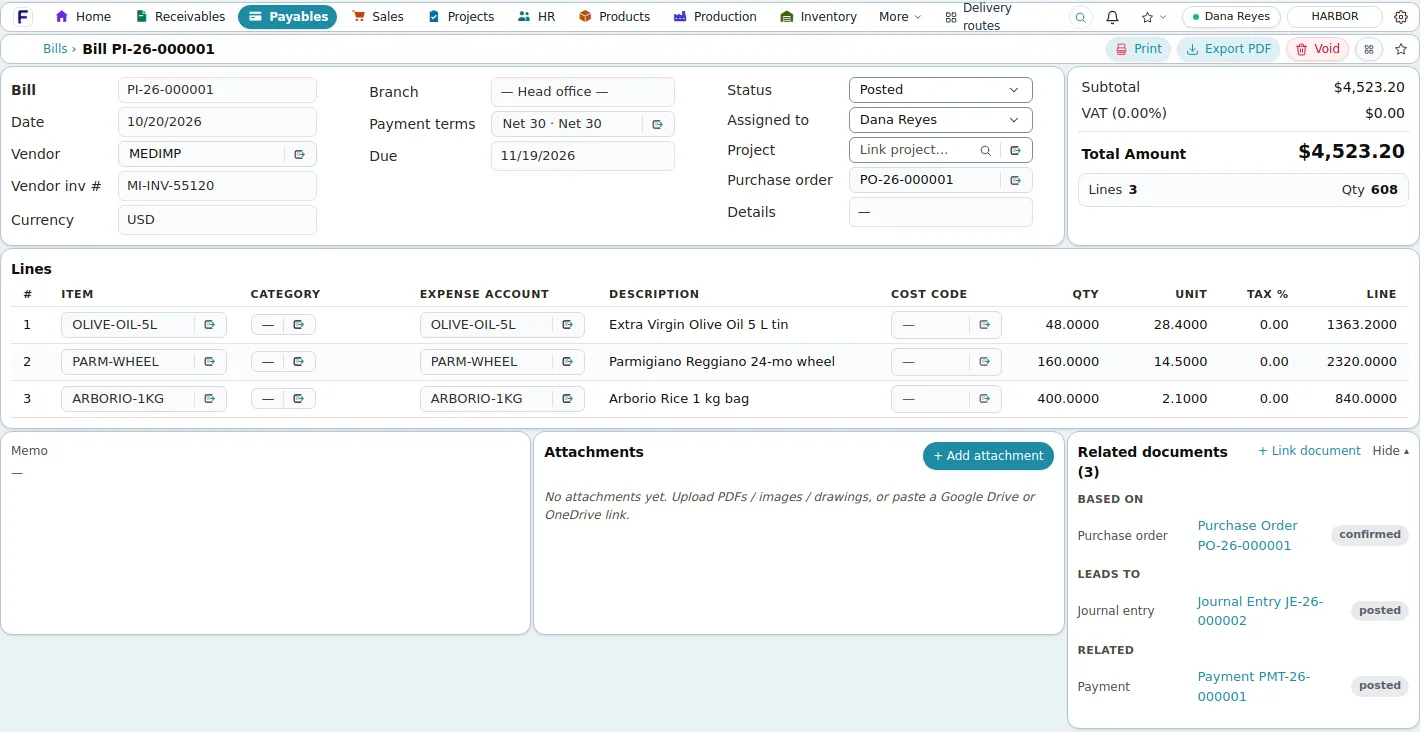
Screens shown are the product's own demo company, Harbor Foods. Figures are demo data.
Problems it solves
- Supplier invoices typed by hand into the accounting system
- Bills paid without checking them against what was ordered and received
- Reorder needs noticed after the stock has run out
- Vendor payments assembled outside the system for the bank
Why it matters
What changes for your business.
Supplier invoices read, not typed
Drop the PDF or photo; AI extraction fills a draft bill that a person reviews before anything is saved.
Matched before it is paid
Three-way match per line shows ordered, received and billed quantities and the price variance.
One payment run, one bank file
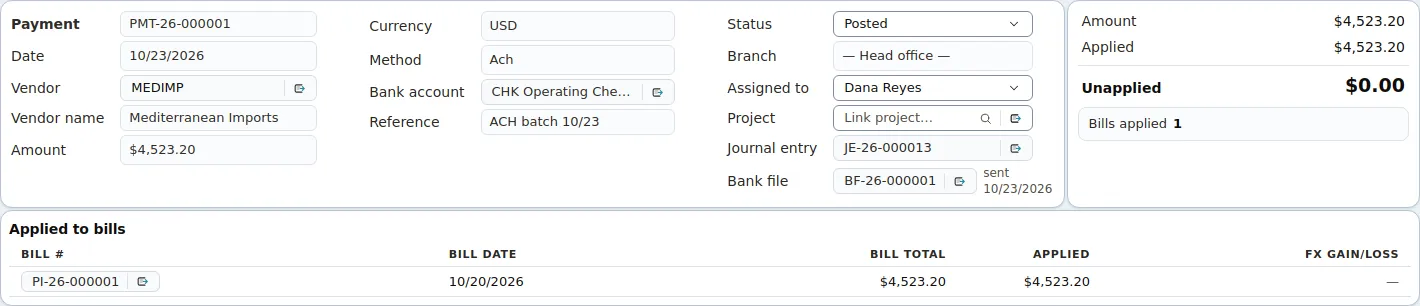
Select open bills across vendors, post the payments and generate the NACHA or CPA 005 file for your bank.
Supplier invoices read by AI
Drop the invoice. Review the draft. Nothing posts by itself.
Each uploaded PDF or image goes through AI extraction with OCR: vendor, invoice number, dates, totals and lines land in a draft bill, and the vendor is matched against your master. A person checks the proposal and saves it as an unposted draft bill. Nothing reaches the ledger automatically.
- PDF, PNG, JPEG, WebP or GIF up to 10 MB per file, 10 files per upload
- Failed extractions stay in the inbox with an error status, never silently dropped
- The reviewed draft follows the normal approval and posting permissions

Paying
One payment run, one bank file.
Payments post from the bank account you choose and generate a NACHA or CPA 005 file for upload to your bank. Voiding a batch frees its payments; check payments take the next check number.
In detail
What it covers
Everything this capability does, grouped. Open it for the specifics your IT team and power users will ask about.
Open the full listClose the list
In detail
What it covers
Everything this capability does, grouped. Open it for the specifics your IT team and power users will ask about.
Open the full listClose the listBuying
- Vendor master with remit-to addresses, bank details, terms, over-receipt tolerance, W-9 on file and a Vendor Hub ranked by year-to-date spend
- Vendor price lists with quantity tiers, vendor part numbers and lead times that default the cost on purchase order lines
- Purchase requisitions with submit, approve or reject and conversion to a purchase order; a reorder-point run raises requisitions for items at or below their reorder point
- Purchase orders with currency and exchange rate, promise date, buyer, ship-to warehouse, discount and tax; confirm, receive, close or cancel; PDF and e-mail
- MRP planned orders convert to draft purchase orders on the preferred vendor
Receiving and matching
- Receive against the purchase order into a location and bin with lots and serials; stock and ledger post through a goods receipt
- Over-receipt tolerance resolved item, then vendor, then company
- Three-way match per line: ordered, received, billed, price variance and received-not-billed
- Bills pulled from a purchase order or a receipt keep price, tax and discount; a receipt from another vendor is refused
Bills and payments
- Vendor bills from draft through pending approval to posted, with expense categories tied to ledger accounts
- Scan inbox: supplier invoices as PDF or photo, up to 10 files of 10 MB each, read by AI extraction into a draft a person reviews
- Pay Bills: select open bills across vendors by due date, create one draft payment per vendor, post from a bank account
- Bank payment files in NACHA (US) or CPA Standard 005 (Canada) format, with remittance advices by e-mail
- AP aging as of any date, 1099 figures with masked tax IDs and a yearly CSV
Good to know
Before you implement, and what this capability does not do today.
We state limits plainly so your evaluation is based on the product as it is; ask in the demo about anything on the roadmap.
Implementation and integration notes
- Bank payment files are uploaded to your bank's portal; there is no live bank connection.
- The scan inbox uses an AI service configured on the server by Fritech; ask about it for on-premises installations.
- Purchase requisitions have an approval step; purchase orders themselves do not.
Current limits
- No landed cost, vendor RFQs, supplier portal or EDI 850/856; advance ship notices are keyed in or posted to the API.
- Requisitions have an approval step; purchase orders themselves do not have an approval workflow.
- 1099 figures are a CSV export; the product does not print 1099 forms or e-file them. Checks take the next number but are not printed on check stock.
See Fritech ERP on your own order, receipt and month-end.
Tell us how your business works. We come back with a few times to choose from, and the demo runs in the product on your scenarios, not a slide deck.