
Inventory and warehouse
Every unit by warehouse, bin, lot and status.
On-hand, reserved and available quantities by location, with lots and expiry dates, serials, user-defined statuses and cost layers. Waves, directed putaway, blind counts and QC gates run from the desk or from the RF scanner app.
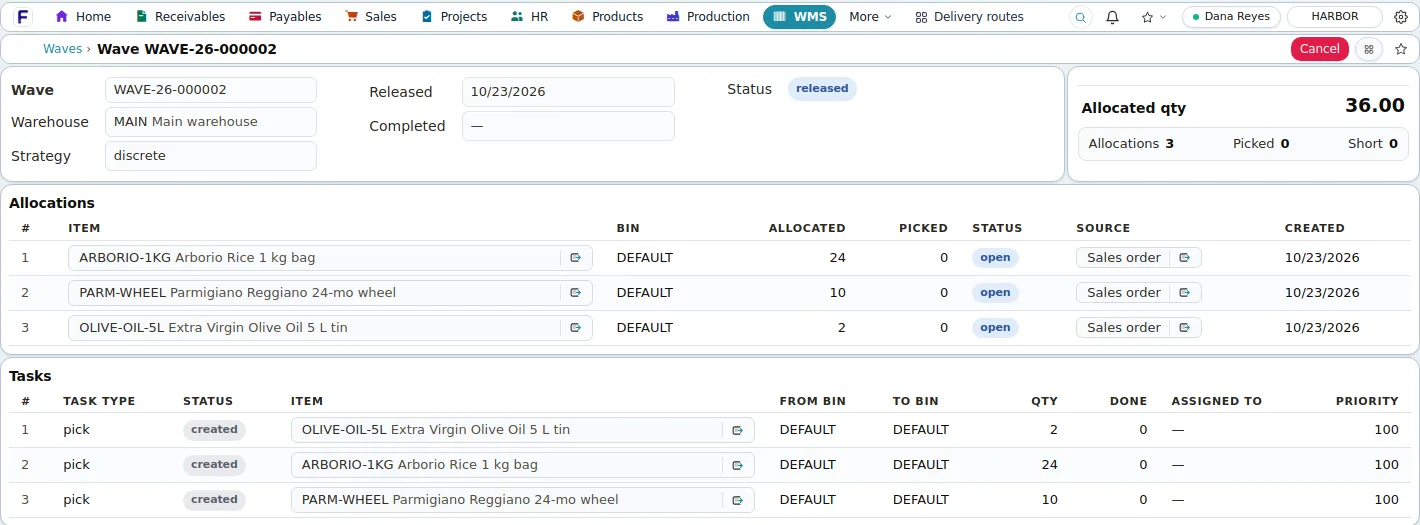
Screens shown are the product's own demo company, Harbor Foods. Figures are demo data.
Problems it solves
- Stock counts that never match the books
- Expired or short-dated stock shipped by mistake
- Pickers walking the warehouse with paper lists
- Receipts put away without a record of where they went
Why it matters
What changes for your business.
Every unit accounted for
On-hand, reserved and available by warehouse, location, bin, lot and status, with a movement log for every line.
Oldest expiry ships first
Allocation follows one rule for the office, the Sales app and the scanner, with no date checking by hand.
The dock works from a handheld
Picks, putaways, counts, packing and shipping run on the RF scanner app, in walking order.
Lots and expiry
The oldest expiry ships first, automatically.
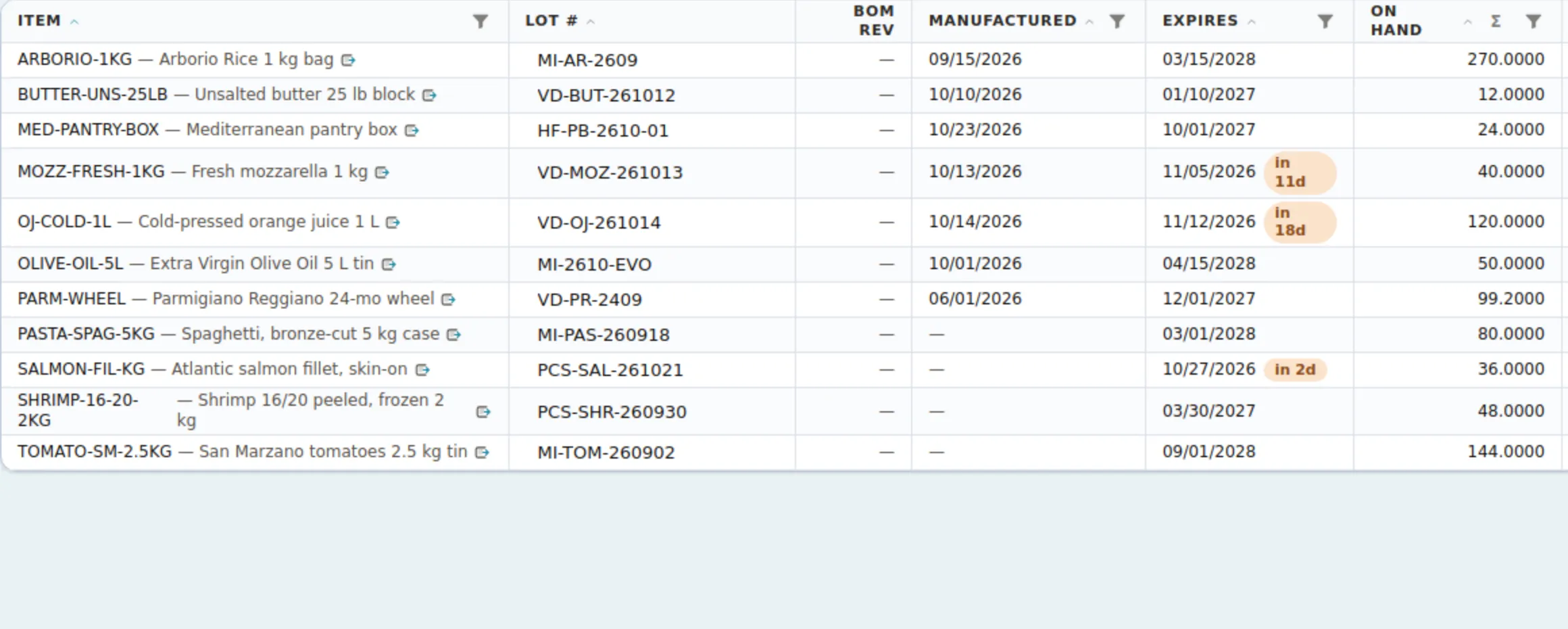
Lots keep their manufactured and expiry dates from receipt onwards and the lots list flags what expires in 30 or 90 days. When an order is released to pick, allocation takes the oldest expiry first and the pick face before bulk.
Receiving
Received against the order, put away by direction.
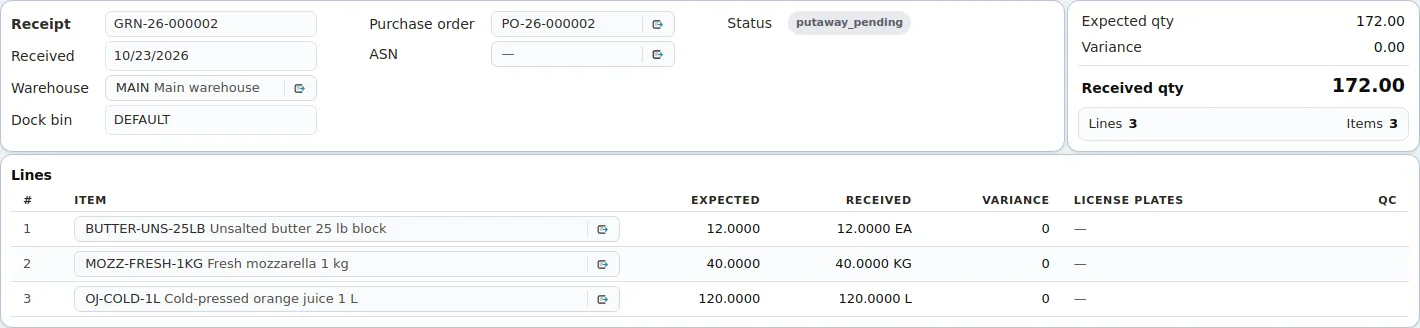
A goods receipt checks quantities against the purchase order line by line, posts stock and ledger once, and creates putaway tasks. Pallets get license plates with printable labels; items that require QC land in quarantine until released.
In detail
What it covers
Everything this capability does, grouped. Open it for the specifics your IT team and power users will ask about.
Open the full listClose the list
In detail
What it covers
Everything this capability does, grouped. Open it for the specifics your IT team and power users will ask about.
Open the full listClose the listItems and stock
- Item master with barcode and GTIN, tracking by lot or serial, costing method (average, FIFO, LIFO, last or standard), planning fields, units with stored conversions, alternates and pictures shared with the Sales app
- Product configurator: pick one option per group to generate an item with its own bill of materials
- On-hand per warehouse, location, bin, item, lot and status with reserved quantity, average cost and value; a movement log of every stock line
- Numbered stock transactions (receipt, issue, transfer, adjustment, status change, conversion) that post quantity and ledger in one step
- Lots with manufactured and expiry dates, serials that cannot be deleted once transacted, and statuses such as quarantine or hold that decide availability
Warehouse operations
- Warehouses with role flags, nested locations, and bins with type, zone, pick sequence and capacity
- Goods receipts against a purchase order, an advance ship notice or blind, into a dock bin, with license plates per pallet and Code-128 labels
- Directed putaway to the home bin or a zone bin with free capacity; pick-face slotting with minimum and maximum and a replenishment run
- Waves released to a staging bin, a desk task board for pick, putaway, replenish, count and pack tasks, pack-before-ship policy per warehouse
- QC gate per plate for items flagged Requires QC: release, reject, partial, scrap, rework, return to vendor or use as is
Control
- First-expiry-first allocation: oldest expiry, then oldest movement, pick-face bins before bulk, then pick sequence
- Available to promise with one rule for orders, the Sales app and the scanner
- Inventory counts from a snapshot with count sheets, found items and one variance adjustment; blind cycle counts by bin on the scanner
- Warehouse transfers between warehouses, locations and bins in one posting, from the desk or the handheld
- Inventory valuation tie-out: stock on hand per inventory account against the posted ledger balance
Good to know
Before you implement, and what this capability does not do today.
We state limits plainly so your evaluation is based on the product as it is; ask in the demo about anything on the roadmap.
Implementation and integration notes
- Goods receipts are entered from the office app; putaway, picking, counts, packing and shipping run on the handheld.
- Bins, zones and pick-face slotting are optional per warehouse; a simple warehouse runs with locations only.
- Opening stock is migrated by Fritech's team from your files; there is no self-service import screen for items or stock.
Current limits
- No landed cost, cross-docking, consignment settlement, catch weight or ABC classification; counts are started by a person, not scheduled.
- Expiry and reorder-point checks are filters and a manual run; there are no alerts.
- Label printing covers license plates; item and bin labels are not printed. Warehouse-level access scopes are saved but not yet enforced.
See Fritech ERP on your own order, receipt and month-end.
Tell us how your business works. We come back with a few times to choose from, and the demo runs in the product on your scenarios, not a slide deck.