
Mobile apps
Two apps for the people who are not at a desk.
Reps sell from the road and the dock works from a handheld, on the same customers, items and stock as the office. Both apps install from the browser with their own device sign-in and are managed from the Admin Center.
Problems it solves
- Orders taken on paper and typed in the office
- Reps without the customer's prices and stock in front of them
- Warehouse staff working from printed lists
- Native apps to distribute and update on every device
Why it matters
What changes for your business.
Reps sell offline
Catalog, prices and last-synced stock on the device; orders are sent and re-priced when a connection returns.
The dock on a handheld
Picks, putaways, counts, packing and shipping on the RF scanner app, with picks queued through Wi-Fi gaps.
Managed from the Admin Center
Per-user app grants, device management, remote sign-out and self-update from the browser.
Sales app
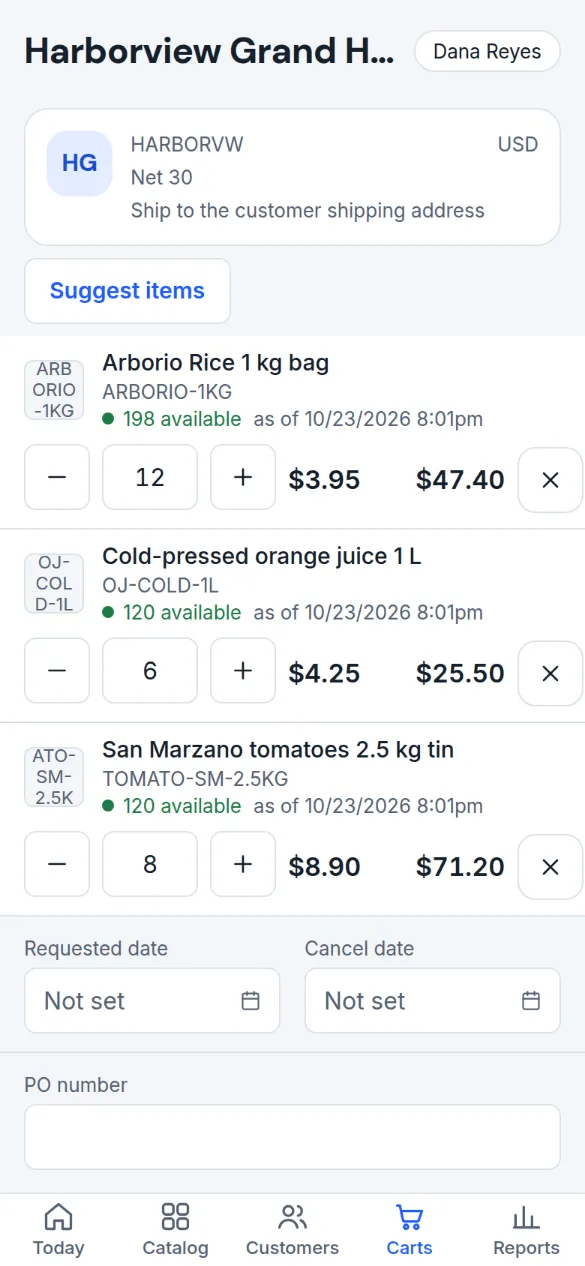
The customer's prices and last-synced stock, with or without a connection.
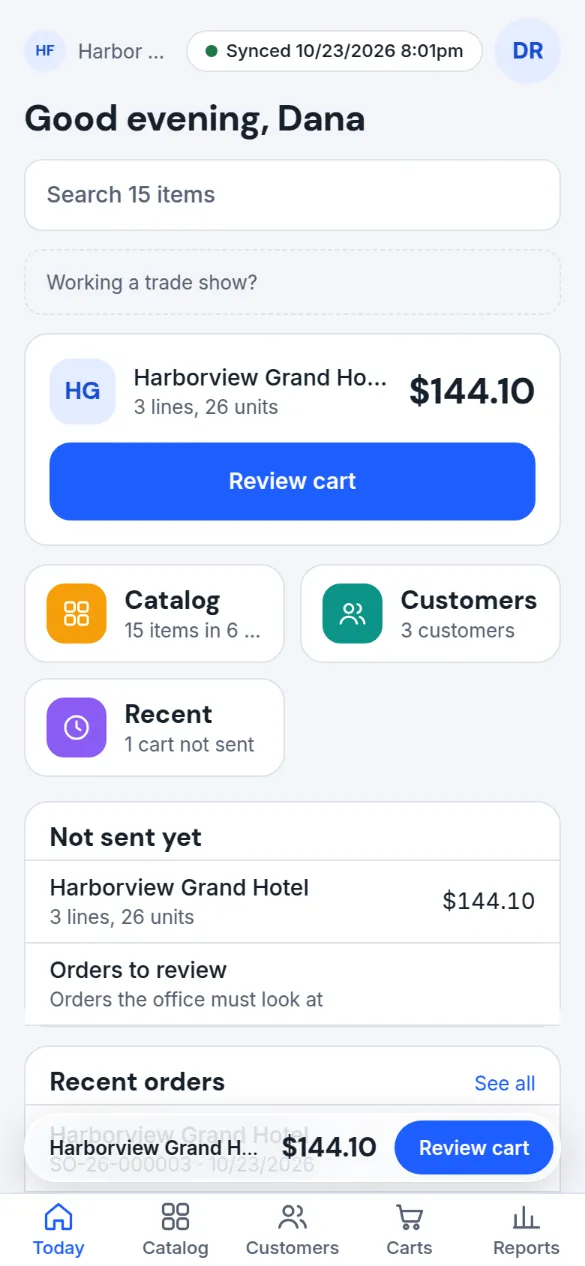
The catalog, prices and a stock snapshot from the last sync are on the device. Reps take orders offline, see which lines were short at the last sync, and send when a connection returns. The office re-prices every line and holds anything that needs a second look.
RF scanner app
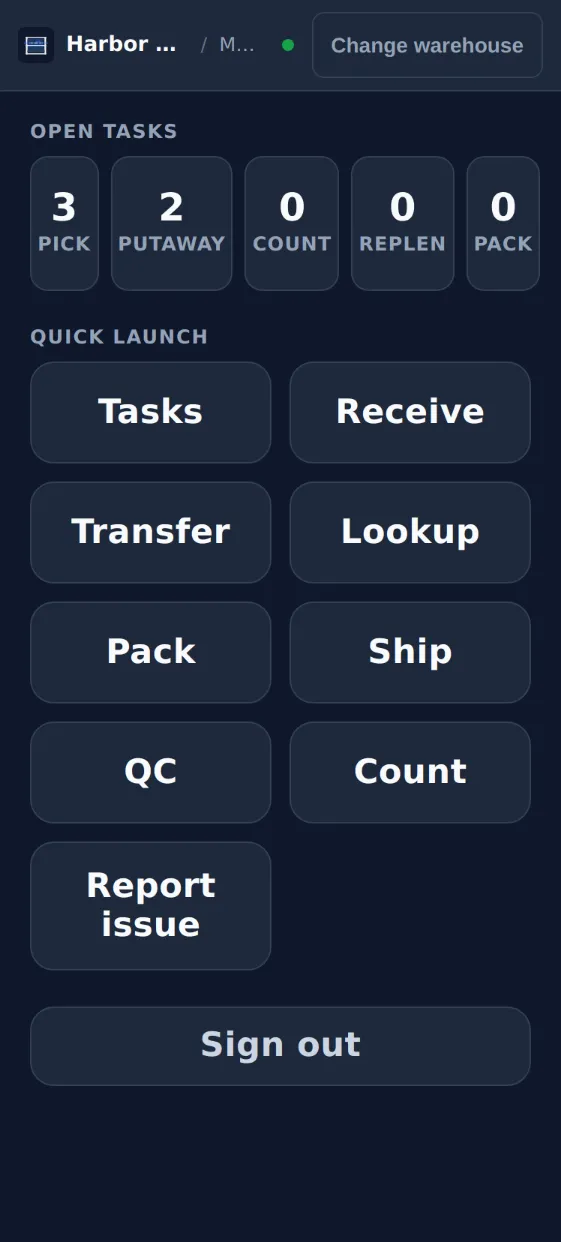
Pick, put away, count, pack and ship from the handheld.
The home screen shows open task counts and the operations the operator may run. Picks and putaways keep working when the Wi-Fi drops; operations that post stock or ledger wait for a connection. Goods receipts are entered from the office app, which then creates the putaway tasks the handheld works through.
In detail
What it covers
Everything this capability does, grouped. Open it for the specifics your IT team and power users will ask about.
Open the full listClose the list
In detail
What it covers
Everything this capability does, grouped. Open it for the specifics your IT team and power users will ask about.
Open the full listClose the listSales app, for reps
- Customers, catalog with pictures, the customer's own prices and last-synced stock badges on the device, usable offline; stock refreshes whenever the device is online
- Search by name, code or scanned barcode; sales catalogs as tiles; filters for in stock, favourites and ordered before
- Several carts at once with PO number, dates, ship-to and terms; a customer whose status blocks orders cannot start a cart
- Send with a server price check: exactly one draft order in the office, every line re-priced, held for review when something changed
- Customer signature on screen printed on the order PDF; confirmation e-mail to the customer from your own mail server
- Customer account on the device: balance, credit, terms, last orders and invoices, open quotes, usual items and order cadence; call, message or navigate from the record
- A customer brief and reorder suggestions from the Companion, offline from synced data
RF scanner app, for the dock
- Putaway, pick, replenish, count, pack, ship, QC, transfer, lookup and exception screens
- Keyboard-wedge scanners or the phone camera where the browser supports it
- Tasks in walking order; My tasks and Available tasks with tap-to-claim; beep and vibration feedback
- Claims, picks, putaways and plate moves queue without Wi-Fi and replay without moving stock twice; counts, QC, transfers and shipping run while connected
- Universal scan lookup of a bin, plate or item with available quantity net of reservations; exceptions with note and photo
Managing the apps
- Install from the browser as a web app; no app-store builds to distribute
- Per-user app grants, device management with remote sign-out, two-factor on device sign-in
- Self-update with a progress bar; an update never interrupts unsent orders; sign-out is refused while orders are unsent
- Rescue export of unsent work; an outbox with retries from one second to one hour
Good to know
Before you implement, and what this capability does not do today.
We state limits plainly so your evaluation is based on the product as it is; ask in the demo about anything on the roadmap.
Implementation and integration notes
- Both apps install from the browser as web apps; ask in the demo about the handheld models and browsers you use.
- The first download of a large pictured catalog takes time on a slow connection, because pictures sync at original size.
- Goods receipts are entered from the office app; the handheld covers the other dock operations.
Current limits
- Both apps are web apps installed from the browser; there are no native App Store or Google Play builds and no push notifications.
- Goods receipts are entered from the office app, not on the handheld.
- The Sales app covers sales; time entry is not in either app. There is no technician mobile app.
- Pictures sync at their original size today, so the first download of a large catalog takes time on a slow connection.
See Fritech ERP on your own order, receipt and month-end.
Tell us how your business works. We come back with a few times to choose from, and the demo runs in the product on your scenarios, not a slide deck.