
Customization and administration
The engine that adapts the system to your processes.
New fields, record types, forms, menus, workflows, procedures, reports and dashboards are configured in the Admin Center, without code or database changes. Roles, permissions, companies and branches keep that flexibility under control.
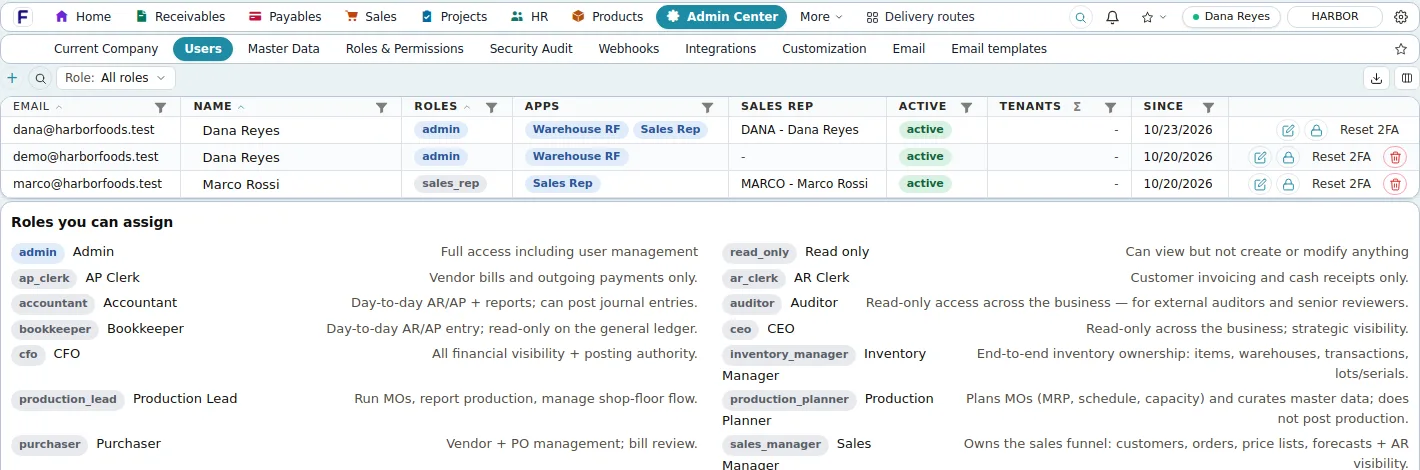
Screens shown are the product's own demo company, Harbor Foods. Figures are demo data.
Problems it solves
- Software that forces the business to change its process
- A new field or record type that needs a development project
- Access rights that are all or nothing
- Changes made in production with no record of who did what
Why it matters
What changes for your business.
Configured, not coded
Custom fields, forms, record types, menus, workflows and procedures from the Admin Center, without database changes.
Access by role
Roles decide who may see and do what, down to a branch or a hidden field, with role templates to start from.
Every change on the record
An audit log with before-and-after values, written in the same transaction as the change.
Custom objects
A new record type in an afternoon, not a project.
Delivery routes, equipment registers, certifications: define the fields and relations, and the product generates the list, the form, validation, permissions, reporting and search. Reports and dashboards treat the new object like any other.

Two-factor sign-in
Every login can carry a second factor.
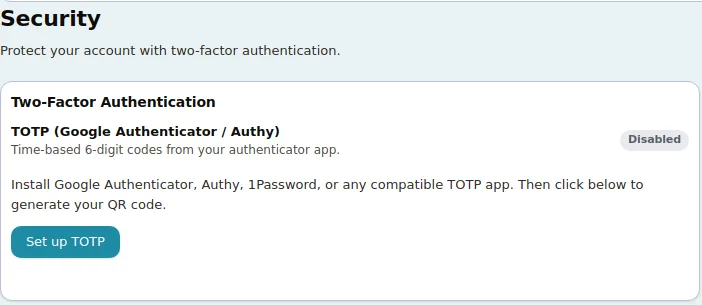
Users enrol an authenticator app from their account page and receive single-use recovery codes. Administrators can reset a user's second factor, revoke devices and deactivate accounts from the Admin Center.
In detail
What it covers
Everything this capability does, grouped. Open it for the specifics your IT team and power users will ask about.
Open the full listClose the list
In detail
What it covers
Everything this capability does, grouped. Open it for the specifics your IT team and power users will ask about.
Open the full listClose the listCustomization engine
- Custom fields of nine types (text, number, boolean, date, select, multiselect, lookup, file, formula) on any of the registered record types, validated on save
- Form designer: sections, drag and hide fields, conditional display; transactional forms keep their line tables
- Custom objects: a new record type with fields, child objects and rollups gets a list, a form, validation, permissions, reporting, search and a menu entry
- Custom menus pointing at a page, a saved report or an object, hidden from roles without the permission
- Customization packages exported as JSON, imported into another company, with named snapshots and restore; business data never included
Access and security
- Roles built from fine-grained permissions (none, view, edit) plus action grants such as Override price, branch data scopes and hidden sensitive fields; role templates to start from
- Two-factor sign-in with authenticator codes and recovery codes for every login; admin reset
- Password policy, single-use reset links, rate-limited attempts, idle and maximum session limits
- Audit log of every create, update and delete with before-and-after values, sign-ins and AI tool calls, written in the same transaction as the change; change history on every record
- App grants for the Sales app and the RF scanner app, with device management and remote sign-out
Companies and documents
- Several companies in one installation; a new company is seeded in one step with fiscal calendar, numbering, terms, tax codes, units, warehouse, chart of accounts, posting rules, templates and roles
- Branches with addresses and per-branch numbering; departments for employees
- Document numbering per type and year with live preview; document type rules such as negative stock and over-completion
- Print templates in a drag-and-drop designer for every printable document type; e-mail from your own mail server with editable templates
- Interface in English, Spanish, French, German and Portuguese; accent themes, fonts and text sizes per user
Good to know
Before you implement, and what this capability does not do today.
We state limits plainly so your evaluation is based on the product as it is; ask in the demo about anything on the roadmap.
Implementation and integration notes
- Most requirements are met by configuration; the ones that are not are built into the same engine by Fritech's team, not by customer-written scripts.
- Customization packages export as JSON and import into another company, so a test company can be configured first.
- Sign-in is e-mail and password with an authenticator second factor; single sign-on is not available.
Current limits
- No single sign-on (SAML, Google or Microsoft), passkeys or IP allow-lists; sign-in is e-mail and password with an authenticator second factor.
- Warehouse data scopes are saved but not yet enforced; branch scopes are.
- The audit log has no export or retention settings; there is no dark mode.
See Fritech ERP on your own order, receipt and month-end.
Tell us how your business works. We come back with a few times to choose from, and the demo runs in the product on your scenarios, not a slide deck.