
AI and automation
Less repetitive work, with a person in control.
The Companion answers questions from your records with read-only tools, finds the screen you need and drafts documents from a sentence. Approval creates a draft; nothing posts from chat. Around the documents, workflows, automation rules and procedures run the routine steps.
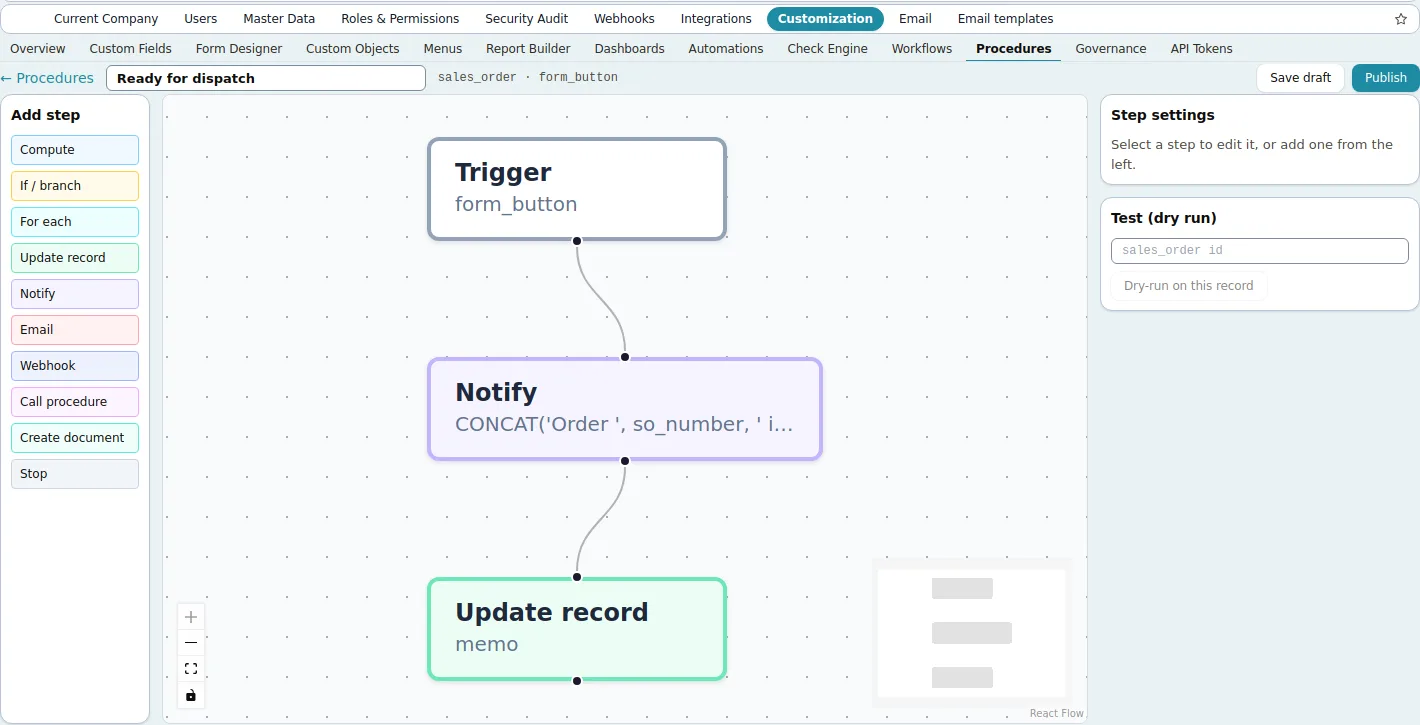
Screens shown are the product's own demo company, Harbor Foods. Figures are demo data.
Problems it solves
- Repetitive entry that skilled people do by hand
- Questions about the numbers that turn into report requests
- Approvals and hand-offs managed by e-mail
- Automation that needs a developer for every change
Why it matters
What changes for your business.
Drafts from a sentence
The Companion drafts orders, bills, quotes and journals that a person reviews; nothing posts from chat.
Documents read by AI
Supplier invoices are extracted into draft bills; AI Insights summarize revenue, margins, cash and risk from live data.
Routine steps without code
Workflows, automation rules and visual procedures run approvals, notifications and record updates.
Try it
A scripted walk through the Companion.
The Companion sits on every screen of the product. It answers from your own records, finds the screen or setting you need, and drafts documents from a sentence. Nothing posts until a person confirms.
Scripted demonstration: the answers below are written in advance from the demo company's records. Nothing on this page connects to an AI service.
Try a question
Ask how the year is going with suppliers, what is overdue, for a draft order or bill, or where a setting lives.
What the product does
- Tool
- None yet
- Offered when
- The role can use the tool
- Audit log
- The tool call is recorded
- Ledger
- Nothing changes from chat
In the product, the Companion runs inside the app for signed-in users, is offered only the tools their permissions cover, and writes every tool call to the audit log.
Workflows
Your document states, your approvals, no code.
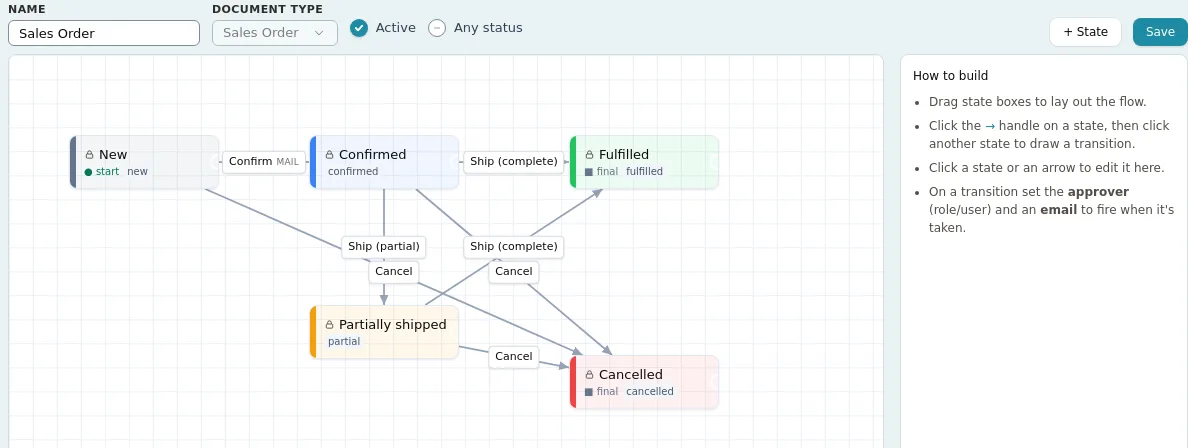
The workflow designer maps each document's states and transitions to the product's built-in actions, so posting, voiding and shipping stay bound to the right state. Approvals go to a user or a role and show up in My Work; every state change publishes a webhook event.
Automation rules
A condition on save, an action in response.
Rules watch a record type for creates, updates or deletes and act when conditions match: a warning, a notification, an e-mail, a webhook, or a block that refuses the save with the message you wrote. A rule that fails to evaluate never breaks the transaction it watches, and recent runs are logged.

What is live, what is scripted, what is planned
In the product: everything listed above, from the Companion and the scan inbox to workflows, rules and procedures, runs for signed-in users today. The Companion, the scan inbox and AI Insights use an AI service configured on the server by Fritech. The Companion reads only what the signed-in user's role allows, never changes a record on its own, and writes every tool call to the audit log. Conversations are not kept as persistent history.
On this website: the Companion demonstration above is scripted. Its answers are written in advance from the demo company's records; it connects to no AI service and reads no data.
Planned: nothing on this page. Customer-written server-side scripts are not offered; procedures and rules are the extension points. Ask in the demo how the AI service is configured for your deployment, including on-premises installations.
In detail
What is in the product
Everything this capability does, grouped. Open it for the specifics your IT team and power users will ask about.
Open the full listClose the list
In detail
What is in the product
Everything this capability does, grouped. Open it for the specifics your IT team and power users will ask about.
Open the full listClose the listAI Companion
- Available on every screen as a bubble, a docked panel or a full page; it knows the record in view
- Finance questions answered from fixed read-only tools: year-to-date overview, open balances, overdue receivables, cash-flow forecast, top vendors
- Drafts you approve: ten document types from sales orders and bills to journal entries and price lists; approval creates an unposted draft only
- “Where is…”: the menu path and an Open button for any screen or setting
- Permission-aware and fail-closed: only the tools the role allows are offered, every tool call is audited, admins set a daily allowance per user
- In the Sales app: a customer brief from synced data, reorder suggestions and proposed cart lines the rep approves
AI reading documents
- Scan inbox: supplier invoices as PDF or photo read by AI extraction with OCR into draft bills a person reviews
- AI Insights in Analytics: concise observations on revenue, margins, cash and risk from live data
Automation without code
- Workflow designer: states and transitions per document with button labels and approvers by user or role; pending approvals in My Work
- Automation rules: when a record is created, updated or deleted and the conditions match, notify, e-mail, call a webhook, warn, or refuse the save with your message
- Procedures: a flow-chart editor with triggers (manual, form button, record event, timer, inbound webhook) and steps that branch, loop, update records, notify, e-mail or call webhooks, with dry-run and a step log
- Background workers for webhook delivery, e-mail, exchange rates, recurring journals, contract billing, due-document alerts and SLA monitoring
Good to know
Before you implement, and what this capability does not do today.
We state limits plainly so your evaluation is based on the product as it is; ask in the demo about anything on the roadmap.
Implementation and integration notes
- The AI features call a third-party AI service configured on the server by Fritech. What is sent to it and how long it is kept is described in the Privacy Policy; ask how it is set up for your deployment, including on-premises installations.
- Workflows, rules and procedures are configured with you during implementation and can be changed afterwards without development.
- Everything on this page is in the product today; the demonstration below is scripted, and nothing here describes planned functionality.
Current limits
- The Companion drafts ten document types; purchase orders are not drafted, and production is reported through the order's own form.
- Notifications are in-app only; nothing is e-mailed or pushed from the notification system itself.
- Customer-written scripts do not run on the server; procedures and rules are the extension points.
See Fritech ERP on your own order, receipt and month-end.
Tell us how your business works. We come back with a few times to choose from, and the demo runs in the product on your scenarios, not a slide deck.